SILENT HILL Townfall DualSense Controls for St. Amelia
Peek, block, swing, and twist the pocket TV — preview mappings from PlayStation Blog and GameSpot.
SILENT HILL: Townfall treats the DualSense as part of the horror, not a menu overlay. PlayStation Blog’s July 2026 hands-on and GameSpot’s preview both map the same core loop: hold L1 to peek, hold L2 to block, press R2 to swing when a creature leaves an opening. Those three inputs are enough to survive Shorefront if you never forget that swinging is the last option, not the first.
Townfall is still upcoming — September 24, 2026 on PlayStation 5, Steam, and the Epic Games Store — so every button listed here is preview-accurate, not a launch-day manual. Konami and Screen Burn Interactive have been consistent across briefings. If a prompt changes after day-one patches, this page will follow updates. Until then, learn the DualSense layout before Simon wakes in the water.
Peek, block, swing
Peek is the most important button in the opening hours. Hold L1 at fences, car roofs, doorframes, and half-walls. Previewers describe a two-stick lean: the right stick aims the camera while the left stick decides how far Simon’s body actually leaves cover. Over-peeking is how you get seen. The combat and stealth guide is the tactics page; this one is the mapping.
When a monster already has you, hold L2 with a melee weapon to catch a charge. The DualSense adaptive trigger adds resistance so a block feels like wood taking weight. Strike with R2 only after the animation commits. Enemies do not crumple in one hit. Wooden planks and pipes last a couple of scrapes, then splinter. If you mash R2 the way you would in an action game, you will be unarmed in a hallway.
Square reloads the revolver later in the preview: Simon seats each cartridge in the cylinder by hand. That is slow on purpose. Gyro aim (optional) lets you twist the whole pad for a headshot instead of fighting the stick. GameSpot’s hands-on is the clip on this page; writer-director Jon McKellan asked press to try gyro before they fired.
CRTV in your hands
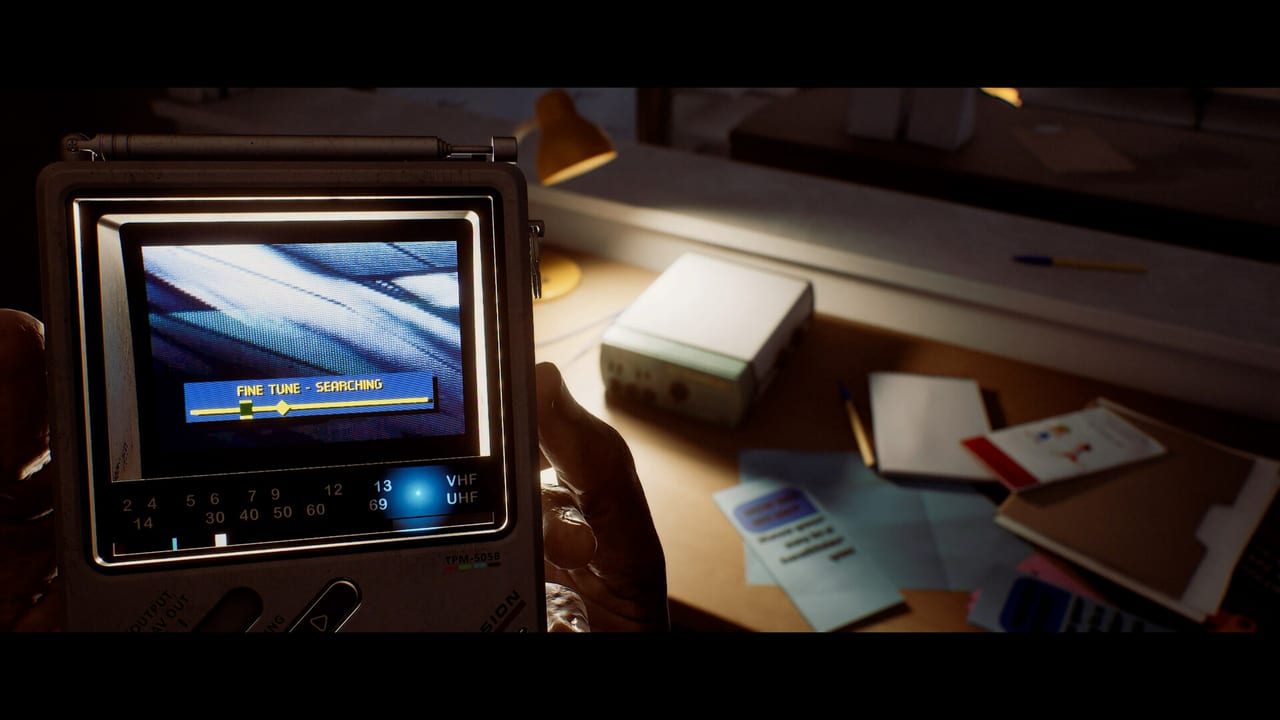
The pocket television is not a pause menu. Raise it, then physically twist the DualSense to hunt a weak analog signal. Motion is optional in settings, but the intended feel is the same motion as lifting a 1990s phone toward a window. When you calibrate against a radio or another device, L1 and R1 nudge the RGB channels into alignment — a short minigame from the preview, not a skill check that fails the story.
Full CRTV systems sit on the CRTV guide. Controls-wise, remember three things: gyro for fine tune, bumpers for RGB lock in the radio puzzle, and the fact that the screen is in first-person because a corner minimap would break the object. You are holding a Watchman-style CRT, not opening a HUD.
McKellan also confirmed motion on the paper map. Tilt the controller as if the map is in your palms and flip it for the legend on the back. It is a diegetic item, the same philosophy as the CRTV.
Haptics, triggers, audio
Haptics carry creature footsteps into the pad while you hide in a closet. PlayStation’s own copy is blunt: feeling a stalker close in while you cannot see it is the DualSense pitch. Combat hits — plank on flesh, the jolt of a successful block — use a sharper haptic layer so you can tell a connect from a miss without staring at a damage number.
Adaptive triggers weight firearms. The squeeze is the gun, not a cinematic rumble. 3D audio on PS5 (TV speakers or headphones, with setup) is the other half of stealth. Splinters under shoes and fabric in an open window are how you notice a room before the CRTV shows a silhouette.
PS5 display modes in the preview: Quality at 30 fps, Performance at 60 fps, presented in a 2.35:1 cinematic frame. Pick Performance if peek timing matters more to you than ray-traced fog. The game is PS5 Pro Enhanced with PSSR; that is a visual note, not a control change.
PC: controller first, keyboard exists
Steam and Epic list full controller support. Keyboard and mouse are in the build — an Unreal Engine 5 title of this type ships a bindable WASD layout — but Konami’s recommendation for Townfall is a controller, DualSense if you can get one on PC. Gyro CRTV tune, haptic footsteps, and adaptive trigger weight do not translate to a mouse. You can still peek, block, and swing from keys; you will miss the analog object.
Motion controls are a toggle. McKellan was skeptical in development and then refused to go back. If gyro makes you sick, turn it off and use sticks. Nothing in the campaign is gated on twisting the pad; firearm aim works without motion, and the radio alignment can be completed with bumpers and sticks. Enable gyro for the revolver section if your hands are steady. Disable it if they are not.
What to set before the docks
- Bind peek somewhere you will not release by accident. L1 is the DualSense default.
- Turn gyro on for CRTV, then decide separately for gun aim.
- Put headphones on. Footstep haptics are a backup, not a replacement for 3D audio.
- Read getting started so you know why you cannot sprint in the first minutes.
- Keep how to survive open if you are the kind of player who swings at the first silhouette.
Townfall’s control scheme is small on purpose. There is no dodge roll and no lock-on carnival. The pad is a plank, a pocket TV, and a pair of ears. If you learn only L1, L2, and the habit of twisting the CRTV before you step into fog, the rest of St. Amelia will wait.
Frequently Asked Questions
Quick answers for launch week and first-person survival.
What are the DualSense combat buttons in Townfall?
Preview builds use L1 to peek, L2 to block, and R2 to swing. Square reloads the revolver one cartridge at a time. Tactics live on combat and stealth.
Is DualSense gyro required?
No. Motion is optional. Gyro fine-tunes weak CRTV signals, firearm aim, and the handheld map. Turn it off if it makes you sick; sticks still work.
Can I play Townfall on PC with keyboard and mouse?
Yes. Keyboard and mouse exist, and Steam lists full controller support. Konami still recommends a controller so CRTV twist, haptics, and adaptive triggers are not missing.
How do L1 and R1 work with the CRTV?
In the radio calibration minigame, twist for signal strength, then use L1 and R1 to align RGB channels. Everyday tuning is gyro plus the analog dial. See the CRTV guide.
Should I pick Quality or Performance on PS5?
Quality is 30 fps; Performance is 60 fps. Both use a 2.35:1 frame. Choose Performance if peek and block timing matter more than ray-traced fog.